Two New Ways to Save Time on Shipping
Dec. 10, 2025
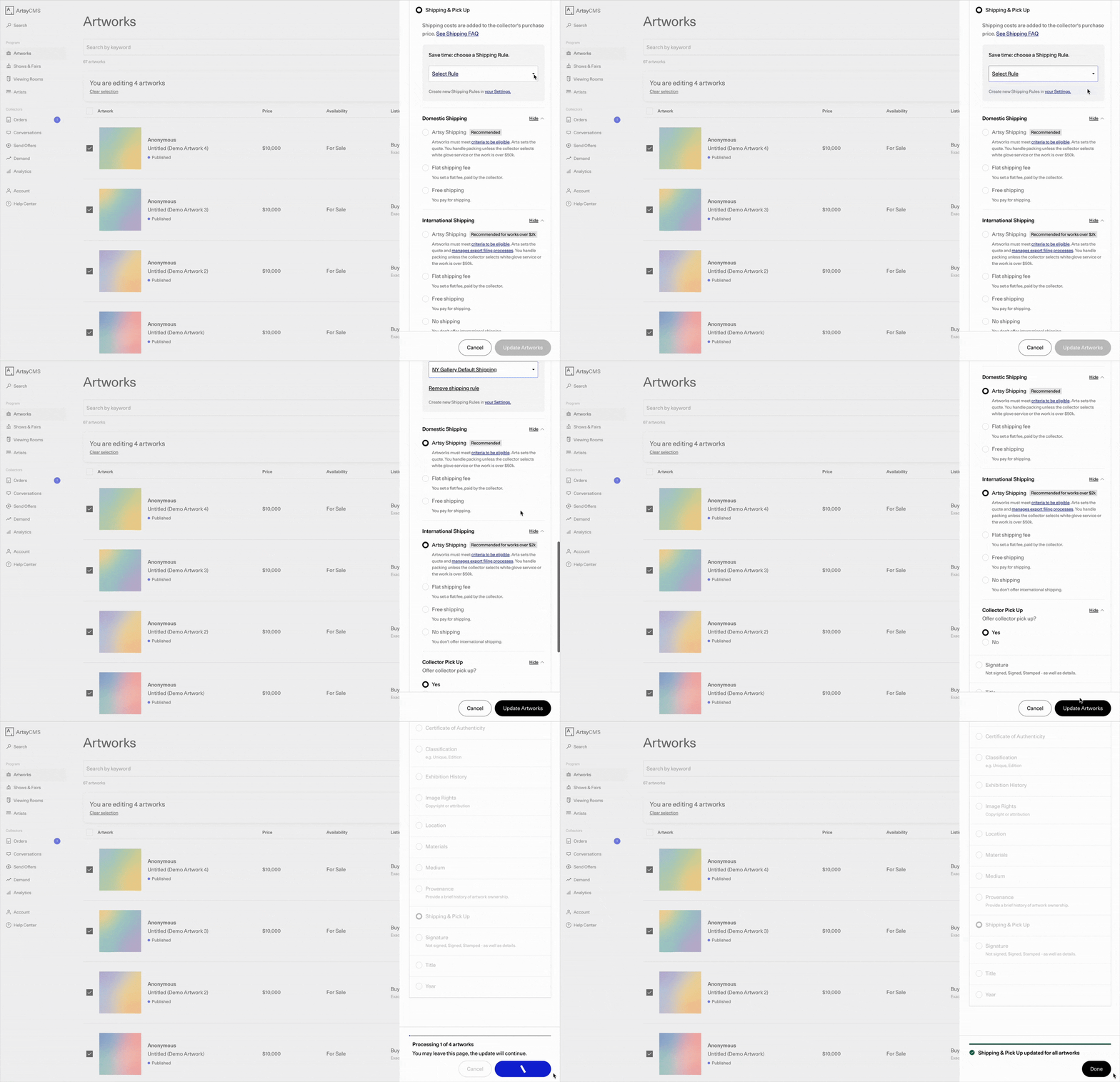
With Shipping Options in Bulk Edit and Shipping Rules, it’s easier than ever to set or update shipping details across your artworks.
And with faster setup in fewer steps, you can avoid repetitive work, publish new pieces faster, and keep shipping info clear for collectors.
Shipping Options in Bulk Edit
Update multiple artworks in seconds
Bulk Edit just got more powerful: you can now update Domestic Shipping, International Shipping, and Collector Pick Up settings for multiple artworks at once—or apply a Shipping Rule in one click.
This is the fastest way to keep existing artworks up to date and get new artworks ready to publish.
How it works
Select artworks and open the Bulk Edit panel
Scroll to Shipping & Pick Up (or search “Shipping” / “Pick Up”)
Select or adjust your shipping options or apply a Shipping Rule
Click Update Artworks
When to use Shipping Options in Bulk Edit
Use Bulk Edit for shipping updates when you want to update groups of artworks, including:
Enable Collector Pick Up or International Shipping options for artworks that may be missing them to maximize exposure
Apply the same Shipping Rule to a large group of artworks
Update your preferred shipping options in one click before publishing new inventory
Shipping Rules
Apply your preferred shipping combinations in one click
Create Shipping Rules to save preset combinations of shipping options—domestic, international, and pick up—and apply them to artworks with one click. Access them on any artwork edit page or in Bulk Edit to quickly add and update shipping options without starting from scratch.
How it works
Create a rule with your preferred shipping options
Apply it on the artwork edit page or in Bulk Edit
Reapply it anytime your shipping preferences change
How galleries use Shipping Rules
Set a flat-rate shipping rule for all prints in a series or paintings of the same size
Set a gallery default rule for artworks to ensure you never miss collector pick up or international shipping options
Create a standard rule to apply to artworks at a specific location
Get Started
Have feedback on Shipping Rules?
What do you think about Shipping Rules? We’d love to hear your feedback: take this 2-minute survey.